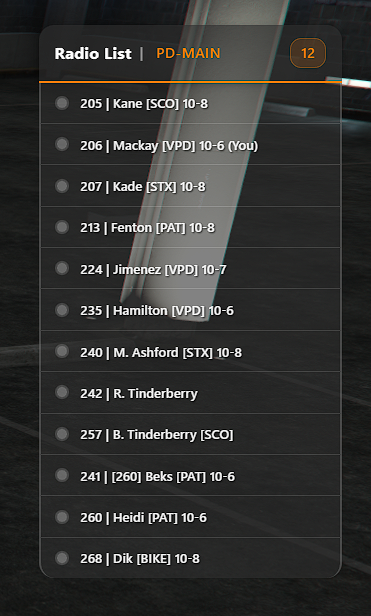
Radio List & Radio Commands

The radio system is a critical operational tool. Officers must ensure their radio name and availability status are accurate at all times so other units and supervisors are aware of their assignment and 10-code status.


Radio Channels

Police Channels

  • Channels 1 – 6

  • Channel 1 – Default channel

  • Channel 4 – Reserved for processing suspects

  • 91.1 – 91.6 – Training channels (non-encrypted)

EMS Channels

  • Channels 7 – 10

  • Channel 10 – EMS default channel

Officers may change channels using:

/rnum {channel}

or by using:

/rchanup
/rchandown

Radio Name Format

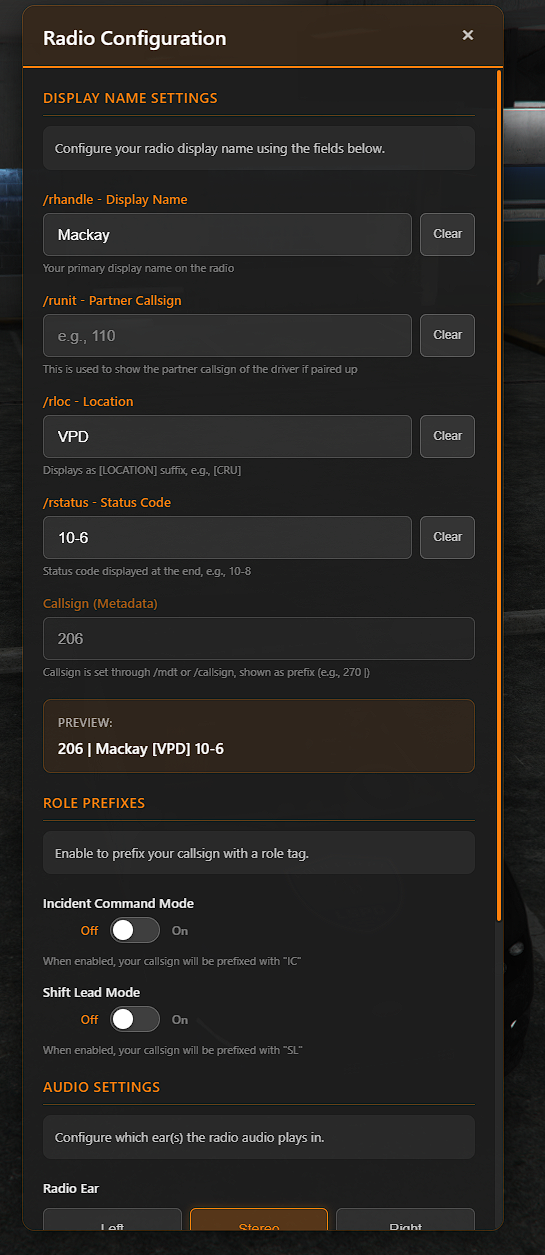
When configured, the radio name format appears as:

Field Breakdown

  • Unit – Partner’s callsign (if applicable)

  • Handle – Officer surname (defaults to first initial + last name, e.g., J. Mackay)

  • Location – Assignment/vehicle/location (e.g., CRU, VPD, A1)

  • Status – 10-code (e.g., 10-8, 10-7)

Your primary callsign is automatically pulled from the MDT.


Setting Radio Name Fields

The following commands allow you to configure individual parts of your radio name and can be keybound for ease of use:

Clearing Fields

To clear any of the above fields, re-enter the command with no arguments:


Examples

Solo Unit (Driver):

With Partner (301 is pilot/driver):


Radio Interface & Display Options

Radio List Display Modes

Volume & Channel Controls


Audio Control (Radio Ear)

To reduce radio chatter or improve clarity, officers may set which ear audio plays through:

Options:

  • left

  • right

  • both


Expectations

  • Officers must keep their 10-code status updated at all times.

  • Channel discipline must be maintained.

  • Channel 4 remains reserved for prisoner processing.

  • Training channels (91.1–91.6) are non-encrypted and for training use only.

Last updated